The problem
A chord progression can use the right chords and still sound disconnected. If every chord starts from its root in the same octave, all three voices can jump at once. Inversions let you keep the harmony while moving fewer notes.
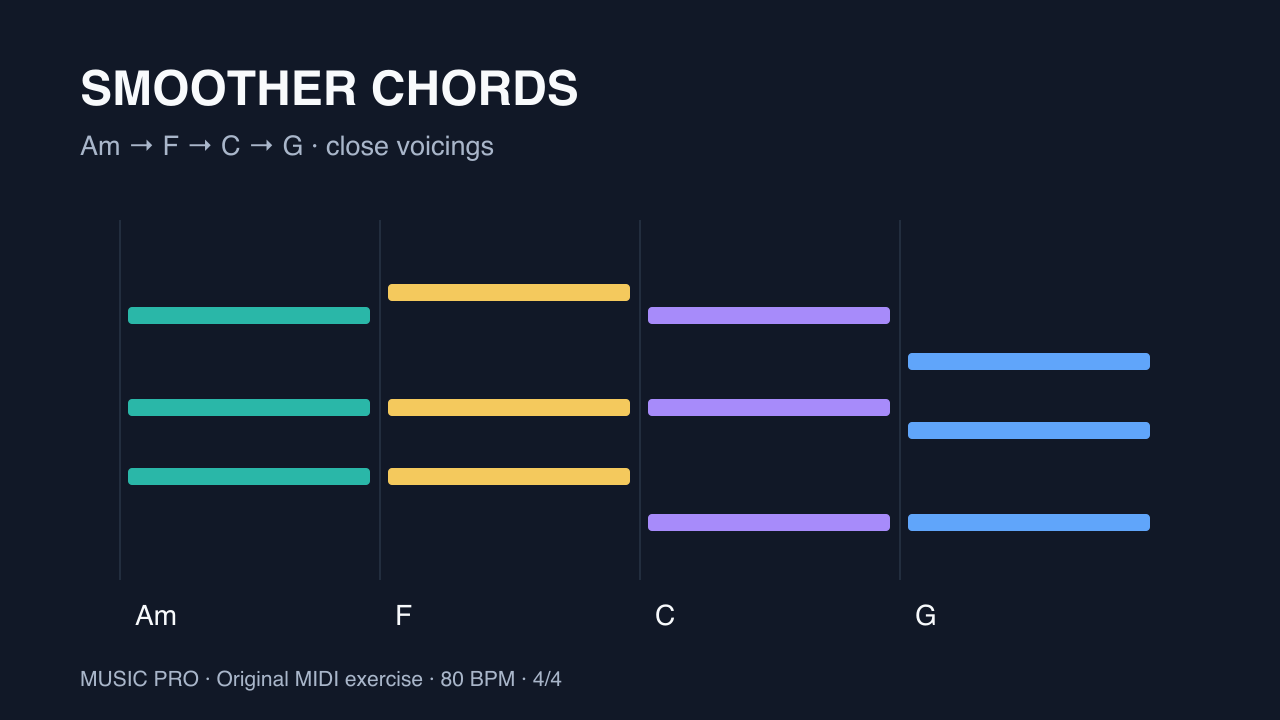
This original exercise uses one chord per bar in 4/4 at 80 BPM: Am–F–C–G. The download contains two separate four-bar chord tracks: root-position chords and a smoother version. Solo one at a time on the same piano sound. These are teaching examples, not claimed generator output. Octave labels here use middle C = C4 (MIDI note 60); some DAWs label that note differently.
Step by step
- Build a plain versionEnter one whole-bar chord per bar: Am = A3 C4 E4 (MIDI 57, 60, 64); F = F3 A3 C4 (53, 57, 60); C = C4 E4 G4 (60, 64, 67); G = G3 B3 D4 (55, 59, 62). Use equal velocities first so timing and loudness do not hide the voicing changes.
- Keep the Am chord and invert FLeave bar 1 as A3 C4 E4. In bar 2, use A3 C4 F4 (57, 60, 65). Am and F now share A3 and C4; only E4 moves, up one semitone to F4. F is still the chord because its notes are F, A and C, even though A is the lowest voice.
- Keep C close to FIn bar 3, play G3 C4 E4 (55, 60, 64). From A3 C4 F4, the bottom voice falls two semitones, the middle voice stays on C4 and the top voice falls one semitone. This is C major in second inversion.
- Finish with G and check the loopBar 4 is G3 B3 D4 (55, 59, 62). G3 stays, C4 falls to B3 and E4 falls to D4. When the loop returns to Am, the three voices rise by two, one and two semitones. Listen to that return as carefully as the changes inside the loop.
- Separate bass choice from chord shapeIf you want root movement underneath the inversions, add a separate bass track with A2, F2, C2 and G2, one note per bar. Keep the chord track above it. The example download leaves out this bass so you can compare the two chord tracks directly.
- Explore voicings in VoiceCraftIn our VoiceCraft, type Am - F - C - G as the progression and choose Close Position. Inspect the voice movement diagram, then open the result in the studio to edit and export MIDI. Its four-voice arrangement may include doubled notes and different octaves; the three-note download here explains the principle rather than promising identical generated output.
Example MIDI
Assign an instrument to each imported track. MIDI files contain notes, not audio.
Tip: Solo the chord tracks one at a time. Playing both versions together defeats the comparison. Shorten chord ends slightly if your instrument blurs repeated notes; add sustain only after checking the voicings.
Common questions
Does an inversion change the chord?
It changes which chord tone is lowest. A C F is still an F major triad; with A in the bass it can be written F/A. A separate F bass underneath changes the overall bass relationship.
Should every chord use the closest inversion?
No. Close movement is a useful starting point. A deliberate jump can support a new section or a melody. Judge the whole arrangement rather than minimizing every move.
Why does the MIDI file contain two tracks?
One contains root-position chords and one contains the smoother voicings. They occupy the same four bars for comparison. Mute one track before playback.